Most organizations start their AI journey with a simple use case: connecting an assistant to a CRM, ticketing system, or knowledge base. Early demonstrations often succeed. The real challenge begins when AI is expected to support business-critical decisions, execute actions, and operate across multiple systems securely and consistently.
At that point, the question is no longer whether an LLM can call an API. The question becomes whether the organization has built a robust AI-facing interface to its business systems.
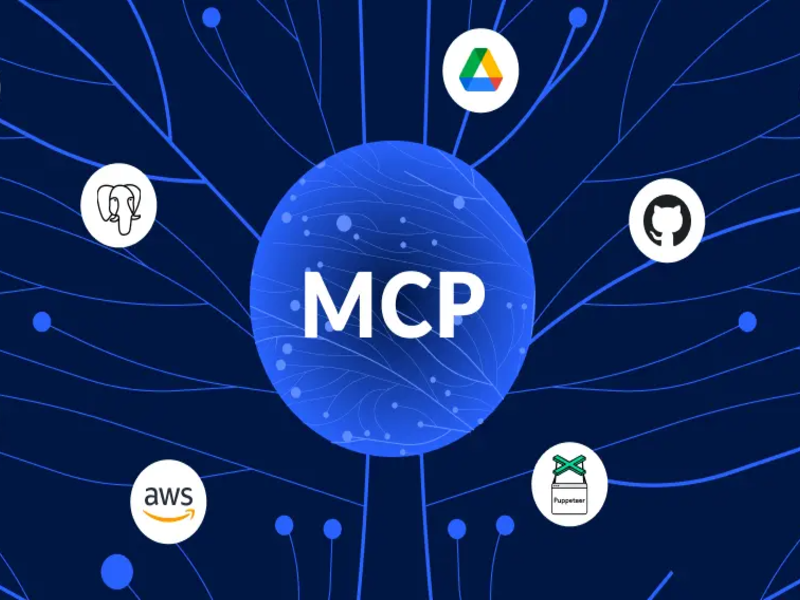
This is where the Model Context Protocol (MCP) comes in.
MCP: More Than an Integration Protocol
MCP should not be viewed as a developer tool or API wrapper. It is the interface layer between AI systems and enterprise applications.
Just as web and UI based applications provide a human-facing interface to business systems, MCP provides a model-facing interface. As such, it requires the same levels of governance, security, reliability, observability, and business alignment as any enterprise platform.
The most common MCP mistakes stem from treating it as a technical integration exercise rather than a business capability layer.
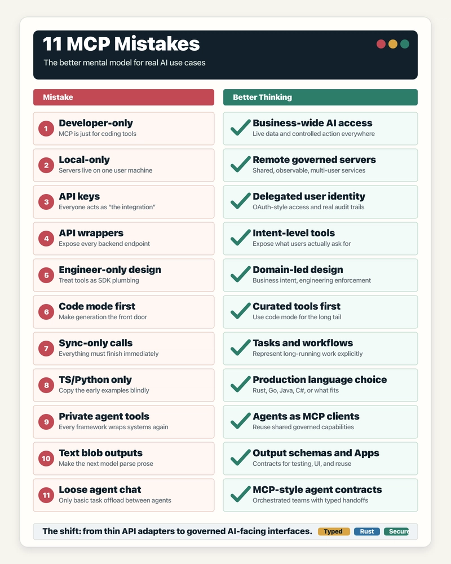
1. Treating MCP as a Developer-Only Technology
While MCP was initially adopted by developers for coding assistants and IDE integrations, its value extends across the enterprise.
Sales, Finance, Operations, Customer Support, HR, and Legal teams all require AI access to live business data and workflows.
MCP is not for developers. It is for any AI use case that requires access to real systems and real-time business context.
2. Assuming MCP Servers Must Run Locally
Local MCP servers are useful for personal productivity and development environments, but they rarely scale to enterprise requirements.
Production deployments typically require:
- Centralized management
- Enterprise identity integration
- Security controls
- Monitoring and auditing
- Consistent policy enforcement
Enterprise MCP servers should generally be managed as shared, production-grade services.
3. Using Shared API Keys Instead of User Identity
Many deployments rely on a single API key for all users. This removes accountability and bypasses existing security controls.
A better approach is delegated identity using OAuth and enterprise authentication.
Benefits include:
- User-level auditing
- Role-based access control
- Easier offboarding
- Compliance with existing governance processes
AI should operate with the same permissions and identity model as the user it represents.
4. Exposing Every API Endpoint as a Tool
Automatically converting hundreds of API endpoints into MCP tools creates complexity, increases risk, and reduces AI accuracy.
Users think in business outcomes, not API calls.
Instead of exposing:
- Get Account
- Get Opportunity
- Get Ticket
Expose:
- Assess Customer Health
- Identify Renewal Risk
- Check Discount Compliance
Design MCP tools around user intent, not backend implementation details.
5. Letting Engineers Design the Tool Surface Alone
Successful MCP implementations require collaboration between:
- Business stakeholders
- Subject matter experts
- Engineers
- Governance teams
Business teams understand workflows, terminology, policies, and decision-making processes.
MCP tool design is a user experience challenge as much as an engineering one.
6. Assuming Code Generation Eliminates the Need for Tool Design
Modern models can generate SQL, API calls, and workflow logic. However, relying entirely on dynamically generated code introduces inconsistency and risk.
The best model is:
- Curated business tools for common tasks
- Guided workflows for repeatable processes
- Code generation for exceptional or long-tail requests
Code generation complements well-designed MCP capabilities; it does not replace them.
7. Treating Every Interaction as a Synchronous Request
Many enterprise activities are long-running:
- Risk assessments
- Invoice processing
- Migration planning
- Portfolio analysis
- Multi-step approvals
These workflows require task management, status tracking, and asynchronous execution.
MCP should represent business processes and work items, not just immediate function calls.
8. Restricting MCP to Python or TypeScript
While Python and TypeScript dominate early MCP examples, enterprise deployments should choose technology based on operational requirements.
Consider:
- Team expertise
- Security requirements
- Performance targets
- Deployment standards
- Maintainability
MCP is language-agnostic. Treat it like any other production service architecture decision.
9. Building Agent-Specific Tools Instead of Shared MCP Capabilities
Many organizations duplicate integrations across chatbots, copilots, and autonomous agents.
A better approach is to create reusable MCP services that can be consumed by:
- AI assistants
- Agent frameworks
- IDEs
- Enterprise applications
- Multi-agent systems
Build capabilities once and expose them through MCP for reuse across all AI experiences.
10. Returning Unstructured Text Instead of Structured Outputs
Enterprise workflows require predictable outputs.
Structured responses provide:
- Reliability
- Easier testing
- Better automation
- Stronger governance
- Improved user experiences
Where appropriate, MCP applications should also deliver purpose-built interfaces such as dashboards, review screens, approval workflows, and visualizations.
Use conversation for interaction, structured data for integration, and UI components for decision-making.
11. Treating Agent Collaboration as Free-Form Conversation
As agent ecosystems mature, agents increasingly depend on one another.
Complex workflows require:
- Defined inputs
- Structured outputs
- Status tracking
- Error handling
- Auditability
- Approval controls
Without these controls, AI systems become difficult to govern and scale.
Agent-to-agent interactions should follow the same disciplined contracts used by enterprise MCP services.
The Common Theme
All eleven mistakes share the same underlying issue:
Treating MCP as a technical connector rather than an enterprise capability layer.
Organizations that succeed with MCP typically:
- Design around business outcomes, not APIs
- Preserve user identity and security controls
- Create shared, governed services
- Deliver structured and reusable capabilities
- Support long-running workflows
- Involve both business and technical stakeholders
- Standardize capabilities across assistants and agents
The Strategic Question
The wrong question is:
How do we connect an LLM to an API?
The better question is:
What AI-facing business interface should exist between our users, AI systems, and enterprise applications?
MCP provides the foundation for that interface. Success depends not on connecting more systems, but on designing a governed capability layer that can be securely reused across assistants, agents, workflows, and business functions.
That is the difference between an AI demo and an enterprise AI platform.
This is an abridged summary of the full (technical) post by Guy, that can be found here: https://dev.to/aws-heroes/11-mcp-mistakes-that-hold-back-real-ai-use-cases-592m