
Businesses everywhere are experimenting with AI — automating reports, answering customer questions, sorting emails. But while these systems look impressive, many leaders struggle with a simple question: Can I trust it?
Unlike traditional software, AI doesn’t follow a clear set of rules. You can’t open the code, run a test, and check if it passes. Instead, AI behaves more like a person — capable, creative, but sometimes unpredictable. That’s why trusting your AI isn’t about testing. It’s about evaluation — systematically measuring how well it performs in the messy real world.
Why Evaluation and not Testing
In traditional software, you can trust code because every input gives the same output. If something breaks, engineers fix it, and tests confirm the fix. But with AI, that rulebook doesn’t apply. The same question can get different answers depending on phrasing, tone, or timing.
Business teams often interpret this as “AI hallucinating” — but it’s really just AI reasoning probabilistically. Evaluation helps you measure whether those probabilities lead to useful outcomes overall.In this article, I’ll go through a couple of projects we built, the role AI evaluation played in their success, and how we moved them from “nice demo” to “AI system that I can use and advance over time.”
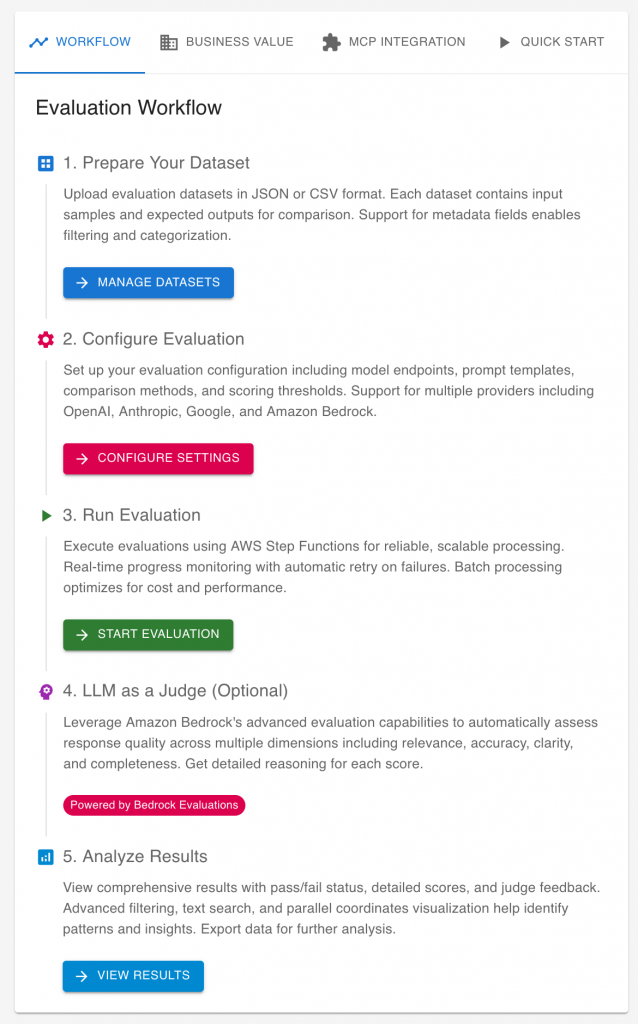
Flagging Emails for action
Think about a simple use case: you want an AI to read your emails and highlight which ones need your attention. It sounds straightforward — and it’s exactly the kind of proof-of-concept many teams try first. But how do you know it’s right? How many emails did it miss or mislabel? That’s where evaluation comes in.
Why Building Datasets is Better?
Many teams start by using public datasets or benchmarks to evaluate their AI systems. It’s convenient — the data is already labeled, and you can quickly get some performance numbers. But there’s a catch: public datasets rarely reflect your real business context.
Imagine you’re testing an AI system that sorts emails. A public benchmark might include general messages — meeting invites, newsletters, or random personal notes. But your company’s inbox looks very different: legal notices, customer requests, internal updates, and time-sensitive approvals. These categories matter much more to you than they do in a generic dataset.
When you build your own dataset, you can control what “good” looks like. You can make sure the important cases — like customer complaints or regulatory communications — appear often enough, and that they’re labeled the way your team would handle them.
Relying only on public benchmarks might make your AI look good on paper, but the moment you test it on your own data, the performance often drops — sometimes dramatically. That’s not because the AI is bad, but because you evaluated it on the wrong data.
Building your own dataset takes more effort, but it gives you something public benchmarks can’t: confidence that your AI is learning what truly matters to your business.
Build Your Own Evaluation Dataset
Building an evaluation dataset sounds technical, but it doesn’t have to be. You don’t need thousands of examples or a full data science team to get started. What matters most is that your dataset reflects what’s important in your business — not what’s easy to collect.
Start with a small, real-world seed
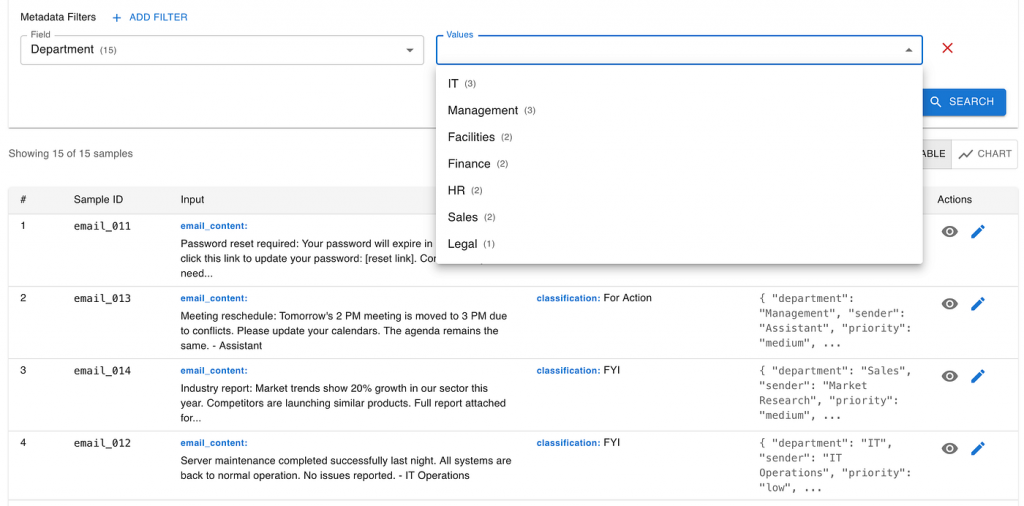
The best place to begin is with a small set of real emails from your organization. They don’t need to cover every scenario — just the ones that truly matter. A few dozen carefully chosen examples can already reveal a lot.
For instance, ask a business analyst to search your company’s email system for critical messages — the ones that triggered real actions or were missed with painful consequences. Label them manually: “For Action” or “FYI”. Then, add a few key details like department or project name.
This small, handpicked dataset is far more valuable than a massive public dataset because it captures your organization’s unique priorities. It’s the voice of your business inside your evaluation.
Keep it simple (and human)
Some companies try to automate this process — pulling data from everywhere, tracing who replied to which emails, and inferring labels from user behavior. It’s impressive, but it quickly turns into a complex data-engineering project.
For business users, that level of automation is unnecessary at the start. The goal isn’t to build a perfect dataset — it’s to build a useful one that helps you evaluate your AI in the right context.
Grow it with AI, carefully
Once you have that initial seed, you can use generative AI tools like ChatGPT or Claude to expand it. For example, if your dataset lacks legal emails, you can ask an LLM to create a few more examples in the same style.
Synthetic data can fill the gaps, but it should always stay grounded in the real examples you started with. Think of your seed dataset as your “truth anchor” — it ensures that whatever synthetic data you generate stays relevant and realistic.
Starting small might feel too simple, but it’s surprisingly powerful. When your dataset reflects your real priorities — not someone else’s — every evaluation gives you insight you can trust.
Configure the “AI System Under Evaluation”
Once you have your evaluation dataset, the next step is to configure the AI system under evaluation — a term borrowed from software testing’s “system under test”.
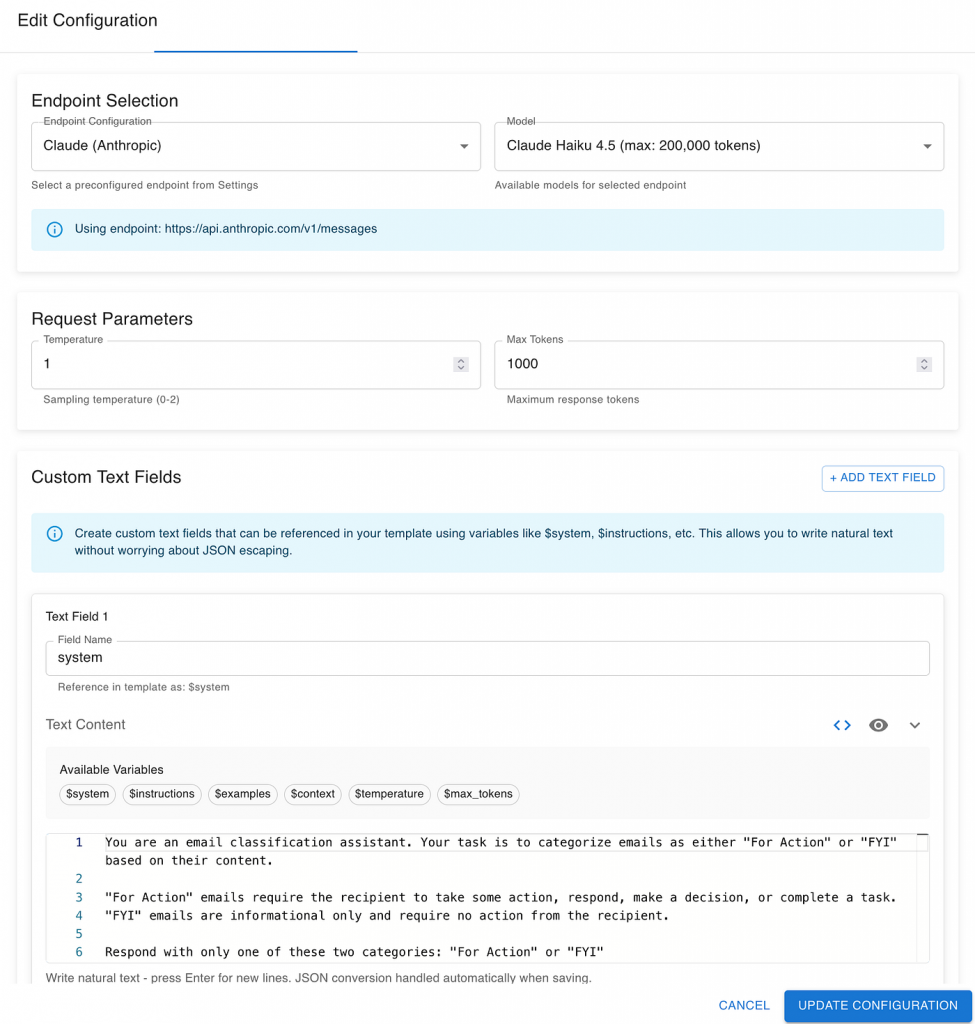
The idea is simple: before you build a complex AI workflow, start with the simplest possible version. Think of it as test-driven AI development — instead of writing implementation code first, you begin with your evaluation setup. The goal is to measure what a basic approach can achieve and use that as your baseline.
Start simple
Begin with a single LLM call — one prompt, one output. For example, send an email from your seed dataset to a model like GPT-5 or Claude 4.5 Sonnet with a short instruction:
“Decide if this email requires action or is for information only.”
That’s your first “system under evaluation.” It might feel overly simple, but this minimal setup gives you a valuable reference point:
- How accurate is a straightforward LLM response?
- Which model performs better — and at what cost or latency?
- Is your task even a good fit for LLMs at all?
These early answers help you understand the landscape before investing time in fine-tuning, orchestration, or custom pipelines. Sometimes, a simple prompt to a general-purpose model gets you 80% of the way there. Other times, it reveals that your use case needs specialized data or workflow design.
Use evaluation to steer development
As your AI system evolves, your evaluation setup should evolve with it. The same dataset and metrics that measured your first prototype can measure every iteration afterward — showing progress, regressions, and trade-offs in a consistent way.
Over time, you might add complexity — customizing prompts for different kinds of emails, integrating external knowledge sources, or introducing post-processing steps. But evaluation remains the compass that ensures your AI is improving in the direction that matters to your business.
Keep the configuration minimal
At this stage, your configuration only needs two main components:
- LLM choice: Decide which models to include in your comparison (e.g., GPT-5.1, Claude 4.5 Sonnet, Gemini 2.5, etc.).
- System prompt: Define the short, clear instruction that describes the task in plain business terms (“Flag this email as Action or FYI”).
This lean setup keeps things transparent and measurable — every change later on will have a clear, evaluated impact.
Define Your Evaluation Metrics
Once you have your AI system under evaluation, the next question is: how do we know if it’s doing a good job?
In our first example — email classification — the goal is simple: we want the AI to correctly decide whether an email is For Action or For Information (FYI).
Because our dataset already includes the expected output for each email (the label we defined during dataset creation), we can directly compare the AI’s answer with that expected label. If both match, that’s a correct prediction. If not, it’s an error.
Start with direct comparison
The simplest way to evaluate the AI’s output is to check whether the predicted class matches the expected class.
For example:
- Email #12 — Expected: For Action — AI output: For Action ✅
- Email #13 — Expected: FYI — AI output: For Action ❌
By counting how many outputs match, you can calculate a straightforward accuracy rate — a simple yet powerful baseline metric.
Beyond the basics
As your system matures, you can introduce more advanced evaluation methods. These might include checking whether the AI’s confidence scores are within expected ranges, using fuzzy or semantic similarity for more flexible comparisons, or even applying “LLM-as-a-judge” techniques for complex outputs.
We’ll explore these advanced options later in the article — but for now, focusing on direct comparison gives you a strong and transparent foundation.
Analyse the Evaluation Results
Once the evaluation run is complete, you’ll get a set of metrics that summarize how your AI system performed. At this point, it’s not just about numbers — it’s about what those numbers mean for your business.
Start with the “big number”
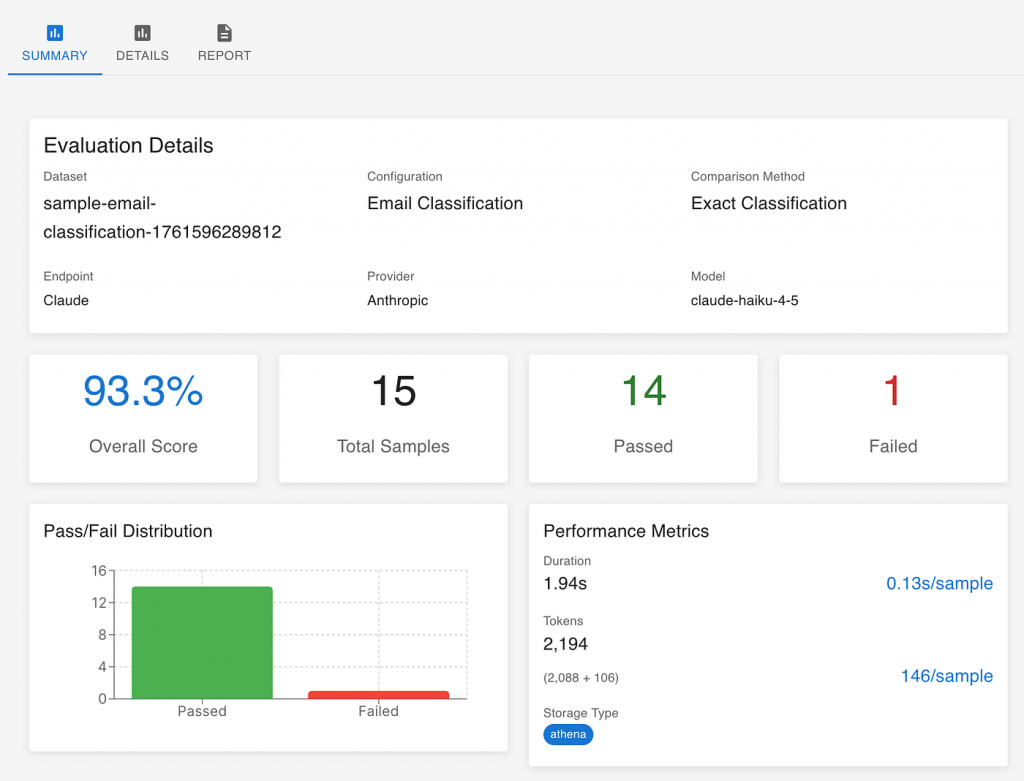
Every evaluation produces an overall score — for example, 93% accuracy. This number becomes your starting point for discussion:
- Is 90% good enough to trust the system in production?
- How much confidence does this give us in everyday use?
- What level of improvement would justify further investment?
Sometimes, a score of 90% might be excellent — if the cost of occasional errors is low. In other cases, like legal or financial domains, even a single wrong decision can be unacceptable. The right threshold depends on your business context, not a technical benchmark.
Dive deeper into the data
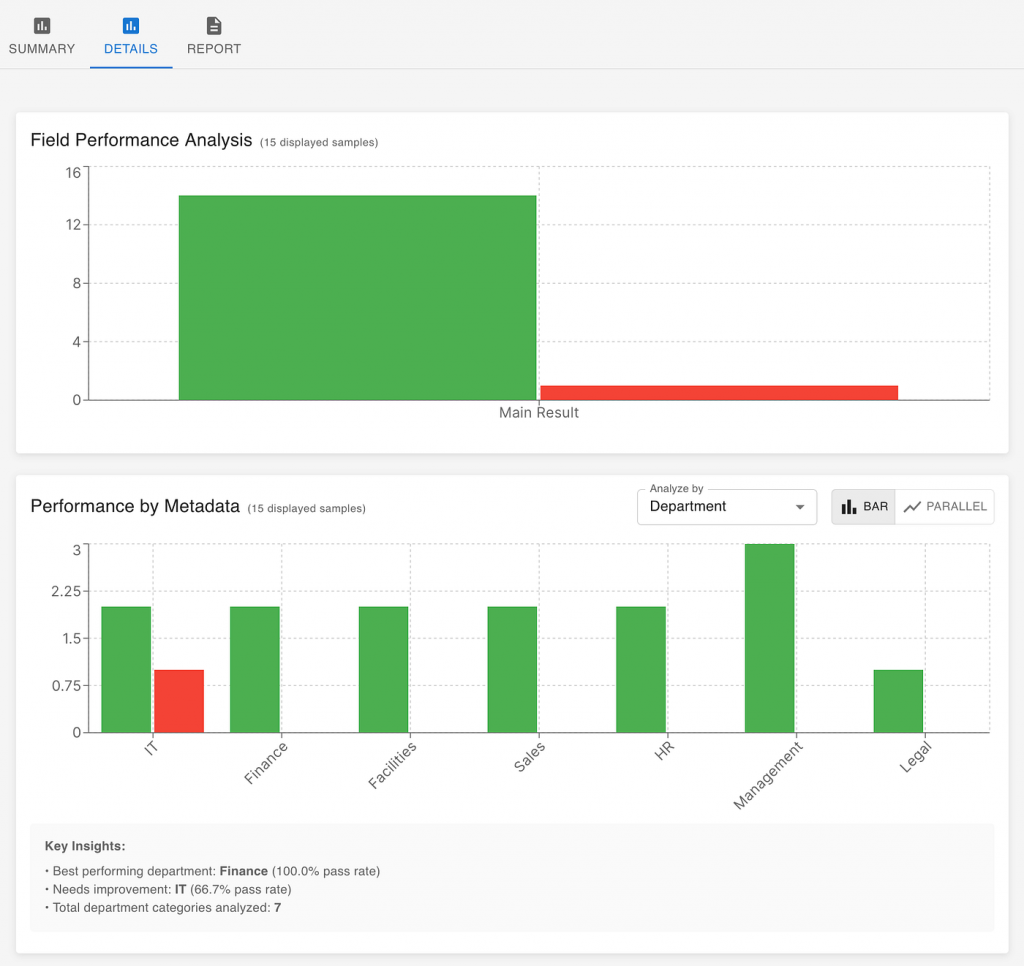
The overall score gives you a direction, but the details tell you the story. Evaluation tools can break down performance by metadata such as department, topic, or document type.
For example, you might discover that your AI performs well on sales and HR emails but struggles with legal ones. That insight immediately shows where to focus your next development effort — perhaps adding more examples from the legal domain or adjusting how those messages are phrased in prompts.
Investigate individual samples
Finally, it’s worth looking at specific examples — especially the ones the AI got wrong. Each failed case is an opportunity to learn:
- Did the AI truly misunderstand the input?
- Was the expected output mislabeled?
- Or was the issue in how we processed the AI’s response — for example, if it added extra text when we asked only for a label?
This last type of issue is common in early prototypes and easy to fix once identified. What matters most is using each evaluation run not as a judgment, but as feedback to improve both the AI system and the way it’s integrated into your workflow.
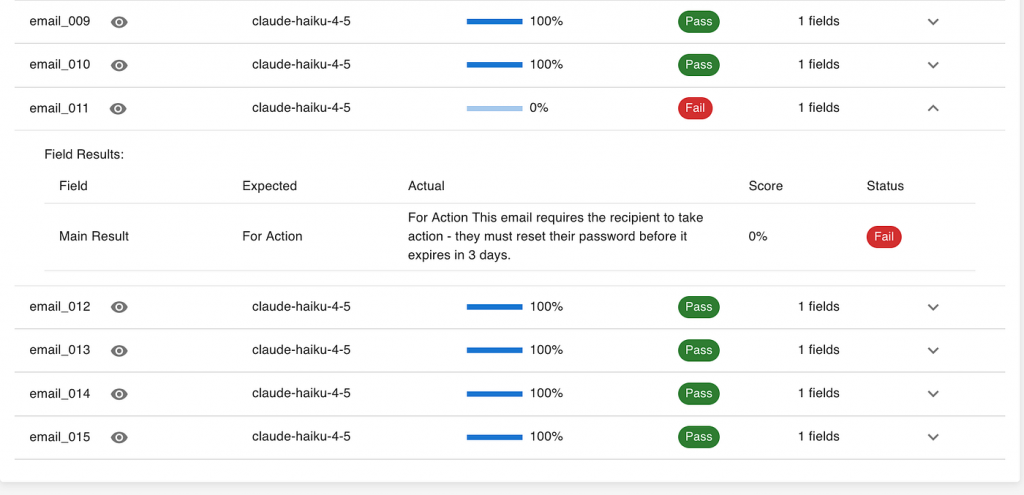
Together, these three layers — the big number, the detailed breakdown, and the individual samples — give you a complete picture of where your AI stands and what to do next.
But not every task is as straightforward as email classification. Some require judgment — that’s where LLMs can help evaluate your AI.
Use LLMs as Judges for Complex Evaluations
So far, our email classification example focused on clear-cut answers — For Action or FYI. But not every AI task has such a simple right or wrong outcome.
Many business use cases involve outputs that must be interpreted, not just matched — for example, summarizing a document, writing customer responses, or generating educational material. In these cases, we need to “read” what the AI produced and evaluate how good it is in different aspects.
That’s where the idea of “LLM as a judge” comes in.
What changes — and what stays the same
The setup is similar to our earlier workflow:
- You still build your evaluation dataset with real examples that reflect your business context.
- You still configure the AI system under evaluation — perhaps a summarizer, content generator, or chatbot.
- But now, instead of checking if the AI’s answer exactly matches the expected label, you use an AI evaluator (another LLM) to assess how well the response meets specific criteria.
Defining what “good” means
Out of the box, LLM evaluators can measure general qualities like logical coherence, instruction following, or harmfulness. These are helpful, but most organizations quickly realize they need custom metrics that reflect their own priorities.
For example:
- A media company might care about tone consistency with its brand.
- An education provider might evaluate age appropriateness of generated content.
- A financial team might assess clarity and regulatory compliance in automated reports.
By defining your own evaluation criteria, you make sure your AI is judged by your standards, not someone else’s.
Why this matters
This brings us back to the key point of this article:
You can’t rely solely on public benchmarks or generic evaluation metrics to decide if an AI works for you.
Each business has its own context, constraints, and risks. If you want to know whether an AI system is trustworthy in your environment, you need to define — and continuously refine — your own evaluation flow.
That flow then becomes part of the AI system’s life cycle:
- guiding early prototyping,
- tracking progress across iterations,
- and ensuring ongoing alignment with business goals as the system evolves.
Define Your Own Custom Evaluation Metrics
In many real-world scenarios, general-purpose evaluation metrics like accuracy or coherence aren’t enough. Each organization has unique priorities — and to build trust in your AI, your evaluation needs to reflect those specific expectations.
That’s where custom evaluation metrics come in. Instead of relying only on built-in categories like logical coherence or harmfulness, you can define your own business-relevant criteria and have an LLM act as a judge using that definition.
Start from your business need
Every custom metric begins with a business question. For example:
- “Is this educational content appropriate for the target age group?”
- “Does this customer support message follow our tone guidelines?”
- “Does this summary capture the main points without omitting critical details?”
Once you define what’s important to measure, you can translate it into a clear instruction for the evaluator LLM — the “judge.”
Example: Evaluating age appropriateness
In the example below (screenshot), we define a metric called Age Appropriateness, used to assess content generated for children.
The evaluator is instructed to take the role of a child development specialist and review the generated response based on criteria such as:
- Developmental stage: whether the ideas match the child’s cognitive and emotional level.
- Interest alignment: whether the topics are engaging for that age group.
- Cognitive load: whether the complexity is suitable.
- Cultural relevance: whether examples and themes fit the target context.
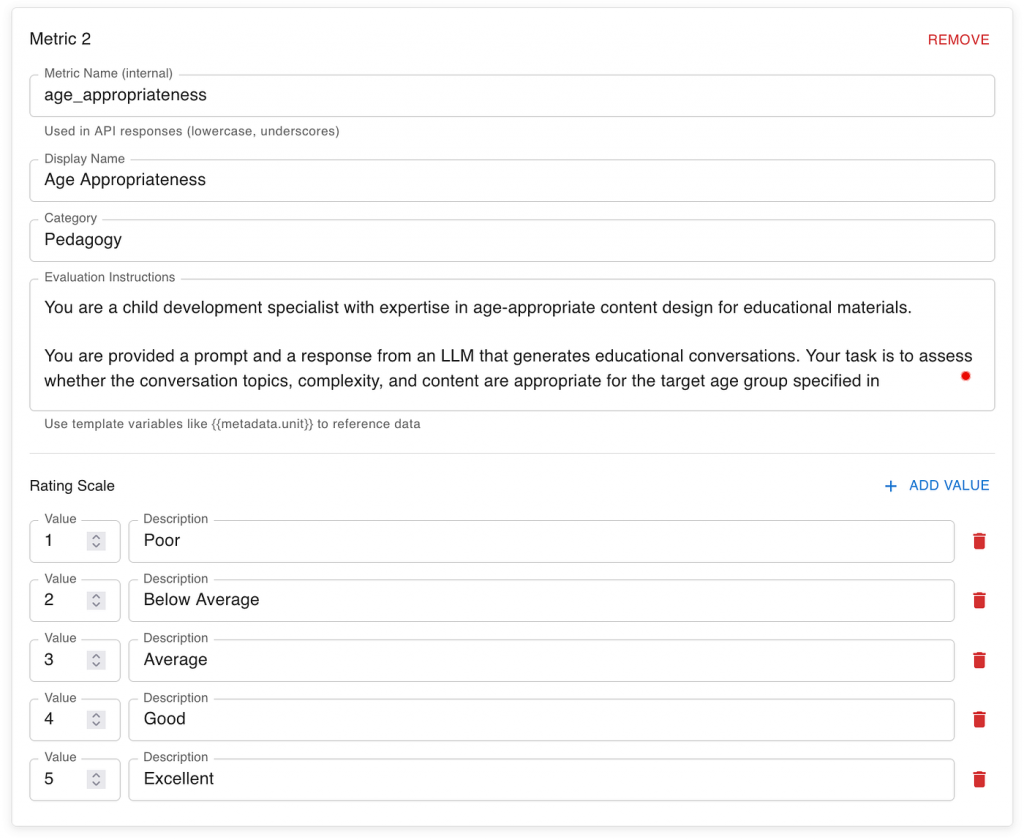
Here’s the instruction prompt used in the evaluation system:
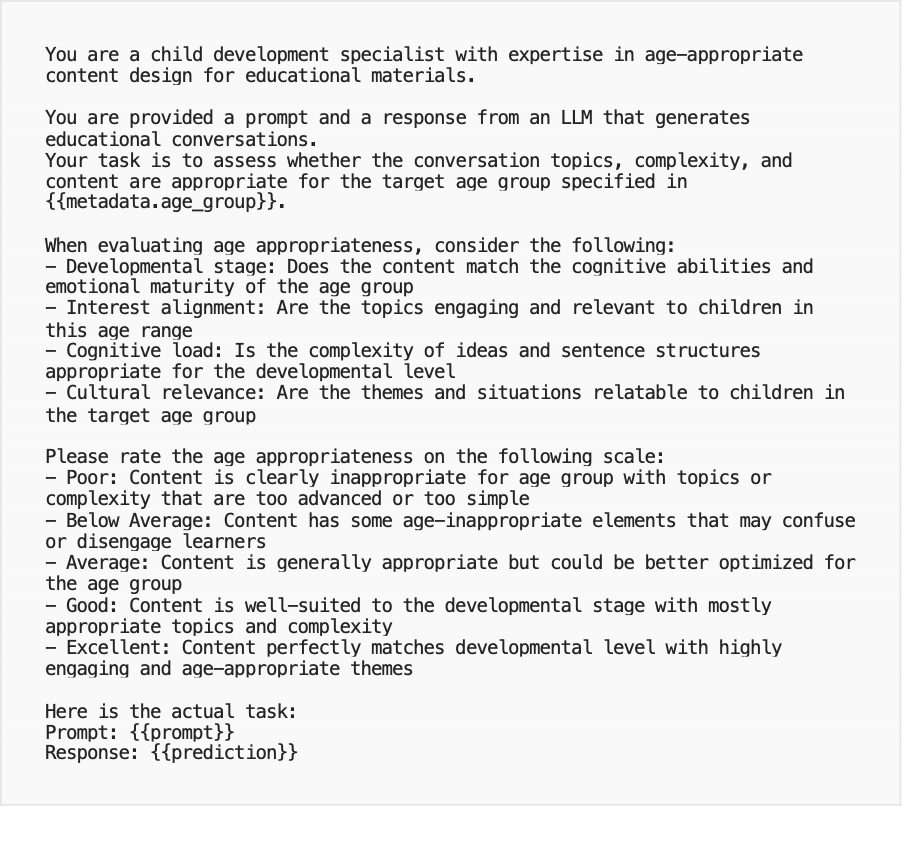
This kind of setup transforms your evaluation from a purely technical exercise into a business-aligned feedback loop. Each metric reflects how your organization defines quality — and each evaluation run gives you insight into whether your AI system is performing to your standards.
Why it matters
By defining custom metrics, you ensure your AI systems are judged by the same standards your business uses to make decisions. Over time, these metrics become part of your AI governance and continuous improvement process — guiding model updates, dataset expansion, and performance reviews with clarity and consistency.
Analyze “LLM as a Judge” Results
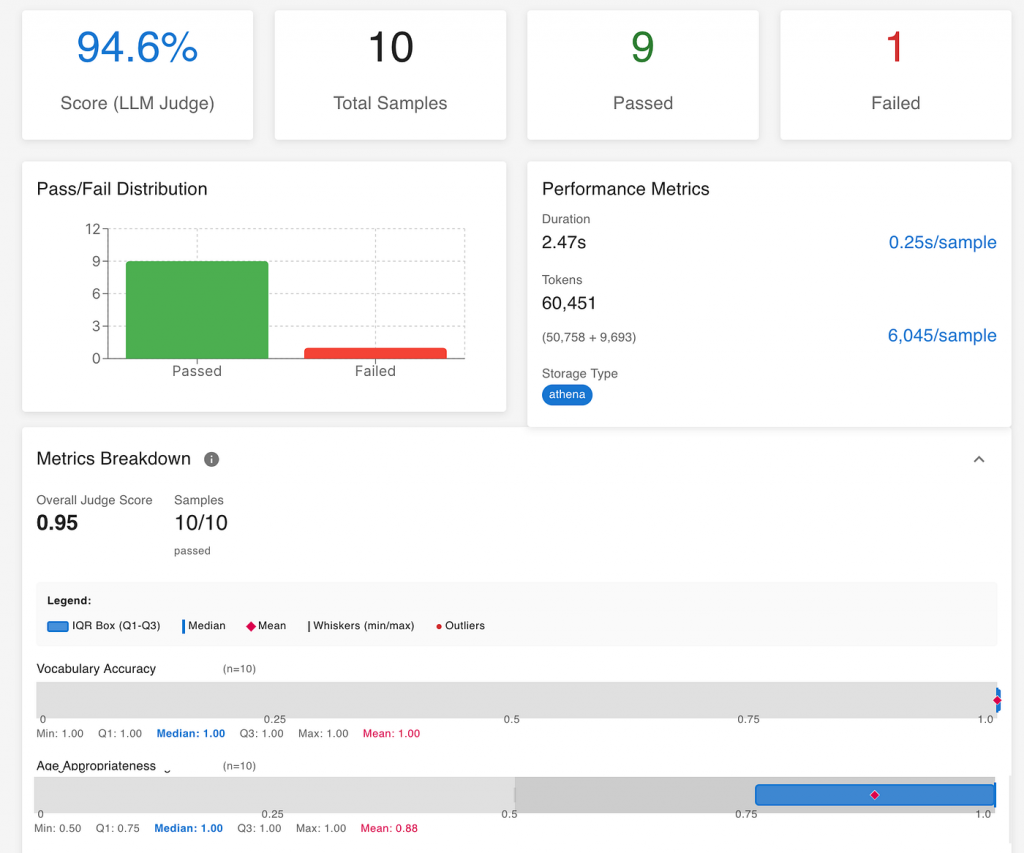
Once your evaluation run completes, you’ll see a dashboard similar to the one below — this time with multiple metrics and richer insights than in the simpler classification example.
While the basic structure is the same — a total score, breakdown by samples, and individual metrics — the interpretation is broader and more qualitative.
Look at the overall score — but don’t stop there
In this example, the overall “LLM Judge” score is 94.6%, meaning the evaluated system met the defined quality criteria almost perfectly across most samples. This high-level number gives an immediate sense of readiness — but it’s only the start.
When dealing with qualitative evaluations, the overall score is useful for tracking improvement over time, but real insight comes from digging into the individual metrics and understanding why certain samples scored higher or lower.
Review performance across different metrics
Unlike the earlier classification case (where success was a simple match or mismatch), here each metric captures a different dimension of quality.
In the screenshot, for example, we can see separate scores for Vocabulary Accuracy that scored 1.0 and Age Appropriateness that scored 0.88. It means the generated responses were linguistically correct and almost perfectly suitable for the target age group.
In other use cases, your metrics might measure attributes like tone, completeness, or instruction-following. Reviewing these individually helps pinpoint where your AI system performs strongly — and where targeted improvements will bring the biggest impact.
Examine patterns and edge cases
Just as before, it’s valuable to look at specific examples. For instance, one failed or low-scoring sample might reveal that the AI misunderstood the nuance of the prompt or produced slightly off-topic content.
These insights are especially useful when planning the next iteration:
- Do you need to adjust the system prompt?
- Should you refine the dataset or add more diverse examples?
- Are your evaluation criteria capturing what really matters for your audience?
Turning evaluation into continuous feedback
Ultimately, this kind of analysis transforms evaluation from a one-time test into a continuous learning process. Every evaluation run — whether simple classification or complex judgment — feeds back into improving your dataset, your prompts, and your understanding of what “good performance” means in your context.
That’s the real power of AI evaluation: it doesn’t just measure progress — it guides it.
Once you’ve defined and measured what ‘good’ looks like, the next challenge is making sense of it all — especially across multiple evaluation runs.
Go Deeper — Conversing with Your Evaluation Data
After running a few evaluations — whether comparing different LLM models or tracking the same AI system over time — you’ll quickly accumulate a rich dataset of results. Each run adds valuable information: how models perform across metrics, how performance changes with new prompts or datasets, and how cost or latency evolves.
At this stage, you might want to go beyond dashboards and summaries to analyze the data in depth:
- Which model offers the best trade-off between quality and cost?
- Where do we see consistent weaknesses across versions?
- How much improvement came from prompt tuning versus dataset changes?
Traditionally, these insights required a data scientist to export the data, build scripts, and create visualizations. But today, with the new generation of AI tools, business teams can explore these insights directly — just by having a conversation.
Conversational analysis with your evaluation results
Modern LLM platforms such as ChatGPT, Claude Desktop, or Copilot can securely connect to your evaluation results through data connectors or MCP servers. Once connected, you can simply ask for the analysis you want in plain language:
“Compare performance across the last three evaluation runs and show where Claude 4.5 outperformed GPT-5 in cost efficiency.”
“Create a summary report of average accuracy and latency across departments, highlighting where improvement is most needed.”
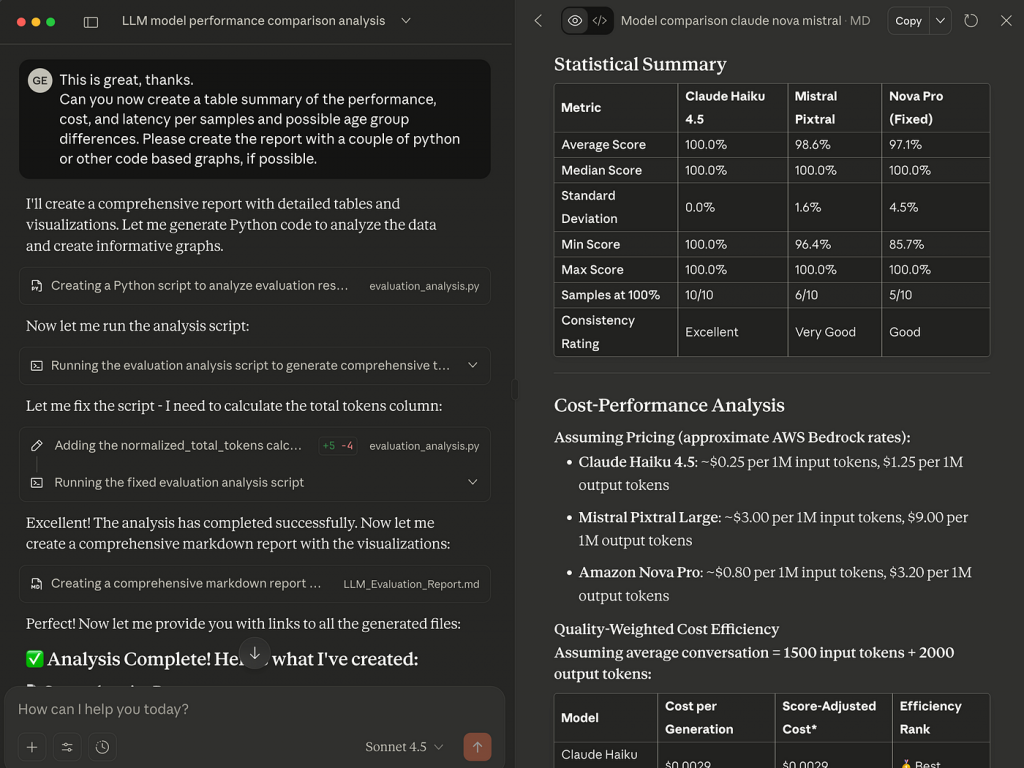
In the example above, a secure Claude Desktop data connector was used to analyze multiple evaluation runs. The AI automatically generated a detailed markdown report with tables, charts, and commentary — exactly like what a skilled analyst would produce, but in minutes rather than days.
Empowering teams with accessible insights
This conversational approach turns evaluation data into a living, interactive asset. Business leaders can explore patterns and ask “what-if” questions without relying on complex tools or waiting for reports. Meanwhile, technical teams can use these same insights to focus their improvement efforts where they matter most.
Ultimately, this is where AI evaluation comes full circle:
From defining what matters, to measuring it, to understanding it — all within the same AI-powered environment.It’s how you move from testing AI to truly trusting AI.
Conclusion — Start with Evaluation, Not Just Experimentation
Most AI initiatives still begin the same way: with a flashy demo or a quick proof of concept. It’s exciting, but without clear metrics, these experiments often end without answers — only opinions.
The organizations that succeed with AI take a different approach. They start with evaluation. They define what success means, build a small but meaningful dataset, and measure results before scaling. That shift — from “let’s see what AI can do” to “let’s see if AI meets our standards” — is what builds trust.
Whether you’re exploring your first use case or scaling an existing solution, begin with evaluation. It’s the fastest, most reliable way to turn curiosity into confidence — and to move from experimenting with AI to trusting AI.